

You just dropped off your pup with your dog walker and walked out the door. Now what? If your brain immediately goes to "Is my dog okay right now?"... you're not alone. That question is exactly what pet care app tracking is designed to answer.
This guide covers two things: what pet parents can actually see while their dog is out on a walk, and how pet care business owners can set up the right tracking and scheduling software to run a professional operation. Whether you're a pet parent looking for peace of mind or a walker building out your systems, we've got you. 🐾
What pet parents actually see during a walk
The short answer: a lot more than you'd expect.
At Sparky Steps, we use DoTimely as our client platform. When your dog goes out on a walk with our team, here's what shows up on your end in real time:
- GPS tracking: You can follow the route live. Every turn, every block, right from your phone. No guessing where your dog is or how far they've gone.
- Visit reports: After every visit, you get a detailed summary, including how long the walk was, potty confirmation (yes, we track that), photos from the walk, and personalized notes from your walker.
- Direct messaging: Need to leave a note before a visit or ask a quick question after? You can message your care team directly through DoTimely.
- Scheduling visibility: You can see upcoming visits, request changes, and confirm your schedule all in one place.
The goal is simple: you should never have to wonder what's happening. You leave, your dog gets walked by someone they know and trust, and you get proof of every minute of it. That's the whole thing.
"Same trusted faces, real-time updates, zero guesswork. Your pet's in good hands, and you'll see every minute of it." 🐾
How to track your pet during a walk: what to look for in any pet care service
If you're evaluating a dog walker or pet sitting service and wondering what kind of tracking they offer, here's what a professional, accountable operation should be able to show you:
- GPS-verified visits: Routes logged and shareable, not just a text saying "done."
- Photo updates: At least one or two photos per visit so you can see your dog's mood and condition.
- Written visit notes: Not a form checkbox — actual notes from the person who was there.
- A dedicated platform: Not texts or DMs. A real system with your account, your pet's info, and a log of every visit.
- Consistent walkers: This one matters more than people realize. GPS and photos are only half the story. A walker who knows your dog's quirks, commands, and body language is the other half. Consistency is its own form of safety.
If a service can't tell you exactly how visits are documented, that's worth paying attention to.
Bonus: apps pet parents can use to track their pet's overall health
Beyond walk tracking, a handful of apps help pet parents stay on top of their pet's day-to-day health, medication, and care routines. These are separate from your dog walker's platform, and they're worth knowing about if you have a pet with health needs or a multi-person household managing pet care together.
DoTimely is the platform we use at Sparky Steps, but it's also available to individual pet parents who want a scheduling and health-log tool for managing their own care at home.
Pawlo is a strong pick for households with multiple caregivers. It syncs tasks in real time so everyone can see what's been done, and it runs about $24.99 per year, which makes it one of the more affordable full-featured options out there.
Crittr focuses on daily habit tracking with a clean, visual dashboard. Great for first-time app users who want something simple and easy to stick with.
PetAccess is built around medical records. If your pet has a complex health history, a chronic condition, or sees multiple vets, having everything stored and accessible in one place is genuinely useful in an emergency.
The honest tip here: start simple. Pick one app, build the habit of logging consistently for a few weeks, and then add features once you know what you actually need. The best pet care app is the one you open every day.

For pet care business owners: setting up your tracking and scheduling software
If you run a dog walking or pet sitting business and you're still coordinating through texts, spreadsheets, or a general calendar app, this section is for you. A purpose-built platform changes the whole operation.
Here's what professional pet care scheduling software should do for you:
- Client and pet profiles: Every client's pet info, vaccination records, emergency contacts, and special instructions in one place. Your whole team can reference it before every visit, not just you.
- GPS-verified visit logging: Every walker's route is tracked and logged automatically. You get the proof, the client gets the proof, and nobody has to take anyone's word for it.
- Automated visit reports: After a visit closes, the report goes out to the client automatically, including photos, notes, and GPS data. This is the single biggest trust-builder in professional pet care. It also takes work off your plate.
- Scheduling and invoicing: Bookings, recurring schedules, holiday rates, and invoicing all managed in the same system. Fewer things fall through the cracks.
- Staff management: Assign visits to specific walkers, manage availability, and track who covered what. Essential once you have more than one or two people on your team.
- Client messaging: In-platform communication so conversations stay organized and documented, not scattered across your personal texts.
We use DoTimely at Sparky Steps and have since early on. It handles scheduling, GPS tracking, visit reports, client messaging, and invoicing in one place. It works for teams of any size and has a freemium model so you can test the core features before committing to a paid tier.
Other platforms worth knowing about in the pet care business space include Time To Pet and PetPocketbook, both of which have strong scheduling and invoicing tools. The right choice depends on your team size, budget, and how much you need the GPS visit-verification layer.
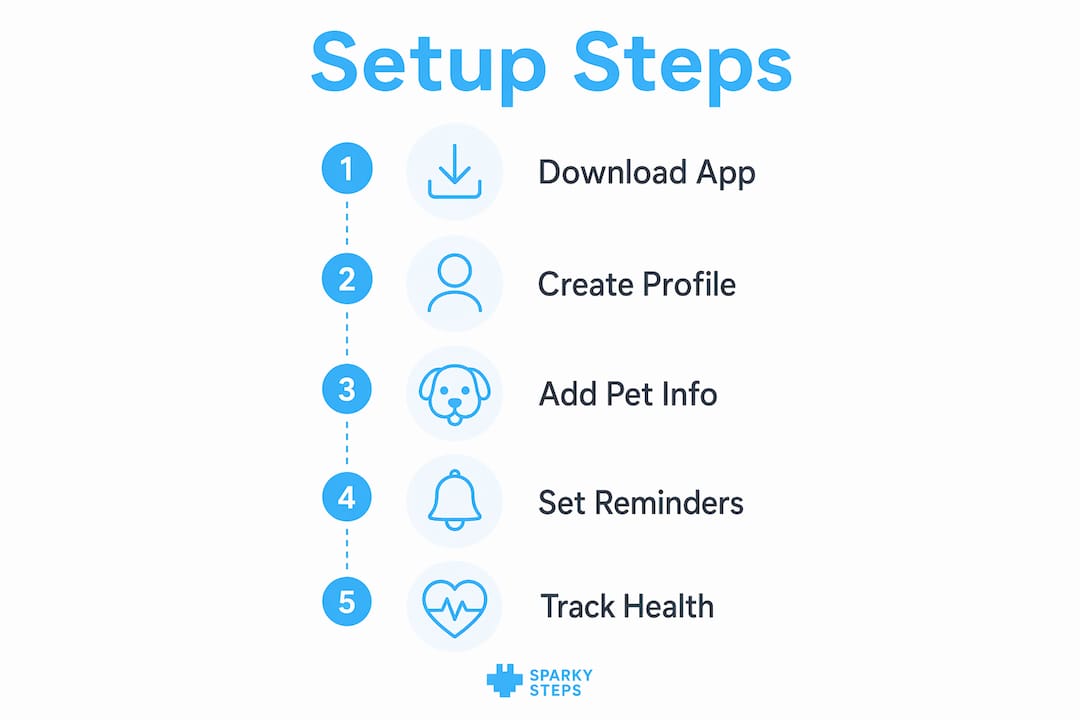
The setup process for any of these platforms is roughly the same: create your account, build out your client and pet profiles, set up your service types and pricing, invite your staff, and turn on automated visit reports. Most platforms walk you through it and have a 7-day free trial. Use the trial. Actually run a few test visits through it before you go live with clients.
The part most pet care businesses skip: consistent walkers matter as much as tracking software
Here's something the app comparison articles don't usually say: software is only as good as the people using it.
GPS tracking tells a pet parent where their dog went. It doesn't tell them whether the person holding the leash knows that their dog gets nervous around skateboards, or that she needs two minutes to sniff before she'll walk, or that she's been a little off her food this week.
That knowledge lives with a walker who shows up consistently. The same trusted team, visit after visit, building a real relationship with the pet and the family. That's why at Sparky Steps, every client gets a consistent care team, not a rotating roster of whoever's available. The tracking software is the backbone. Consistency is the heart of it.
If you're building a pet care business, build both. Get your systems right, and then build the kind of team that makes pet parents feel like their dog has a second family. That combination is what separates a professional operation from a gig app.
Key takeaways
- Pet parents using a professional service like Sparky Steps can follow their dog's walk in real time via GPS, receive post-visit reports with photos and notes, and message their care team directly through DoTimely.
- When evaluating any dog walker or pet sitter, look for GPS-verified visits, written notes, photo updates, and a dedicated platform rather than just texts.
- For personal pet health tracking at home, apps like Pawlo, Crittr, and PetAccess offer solid options depending on your household setup and your pet's needs.
- Pet care business owners should be running a purpose-built scheduling platform with GPS visit logging, automated reports, and staff management built in. DoTimely is a strong starting point.
- Tracking software and consistent walkers work together. Neither one alone is enough.
Sparky Steps: the tech and the team, together
Sparky Steps has been serving Chicago pet parents since 2016, and the way we think about technology hasn't changed: it's a tool that makes the human part of pet care more transparent, more reliable, and more accountable. It doesn't replace the person who knows your dog by name.
Every Sparky Steps client gets real-time GPS tracking, post-visit reports with photos, direct communication with their care team, and the same trusted walkers at every visit. Whether you're a pet parent looking for peace of mind or a fellow pet care professional looking to level up your systems, we're happy to talk through how it all works.
FAQ
Can I track my dog's walk in real time?
Yes. When you book with Sparky Steps, you get access to our DoTimely client portal, which includes GPS tracking during your dog's walk, plus a full visit report with photos and notes delivered automatically after each visit.
What should I look for in a pet care app as a pet parent?
Look for GPS-verified visit logging, photo updates, written notes from the walker, and a dedicated platform where your pet's info is stored and accessible. Apps like Pawlo (great for multi-caregiver households), Crittr (clean daily tracking), and PetAccess (medical records) are all solid options for personal health management alongside your dog walking service.
What scheduling software do professional pet sitters use?
DoTimely is a strong choice for pet care businesses of any size, with GPS tracking, automated visit reports, client messaging, scheduling, and invoicing in one platform. Time To Pet and PetPocketbook are also widely used in the industry.
How do pet care apps help business owners?
A purpose-built platform automates visit reports, logs GPS routes for accountability, manages staff scheduling, handles invoicing, and keeps all client and pet info centralized. It reduces the administrative load significantly and builds client trust through automatic, documented communication after every visit.
Is DoTimely only for businesses, or can individual pet parents use it too?
DoTimely is primarily designed as a business platform, but individual pet parents can use it for personal scheduling and pet management as well. If you're just looking for a health and habit tracking app for your own pet, Pawlo or Crittr are more consumer-friendly starting points.
Why did the dog sit in the shade? Because he didn’t want to be a hot dog! (We had to.)
Written by the Sparky Steps Team.
Authorship Note
The content above aligns with the values of Sparky Steps LLC. While our trusty artificial intelligence helped organize the article, whip up some fun images, and translate ideas into clear, practical language, the final masterpiece is a delightful collaboration between passionate human writers who adore animals and a sprinkle of artificial intelligence magic. Remember, if you think writing is easy, try typing with paws!


